Amp
Probe Setup
ADL-7100 / Sun LS-2000
ADL-7100 / Sun LS-2000
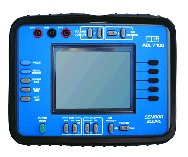
The UEI ADL-7100, also sold as the Sun LS-2000, is a powerful lab scope. It has a high screen resolution and fast screen update.
Lab scope
- Set input coupling:
- Select button on right margin for channel 1 (or 2, whichever your probe is in).
- Select DC input coupling.
- Set volts per division setting. Start
by using the value that correspond directly to the current probe calibration
setting you desire:

- Locate the VOLT/DIVISION control at the bottom of the instrument, and make the selected adjustment (100mV is the same as 0.1V).
- This instrument allows for the vertical adjustment of the 0 volts line. To set the vertical positioning, locate the button next to the volt per division setting. Position the 0 volt line at the bottom of the screen aligned with a horizontal graticule line.
- Set the TIME/DIVISION setting according to the circuit to be tested. 5ms/division is a good general starting point.
- Once the signal is on display, set the
trigger:
- NOTE: Signal for trigger is channel 1. Therefore, if you are only using the current probe, the probe must be onto channel 1.
- Press the trigger button on the right of the screen.
- A menu appears: AUTO, NORM (GLITCH), SINGLE, and SLOPE. Start with AUTO (automatically update). Later you may wish to set to NORM (update only when signal reaches trigger requirements).
- Next, select SLOPE and note the slope indicator at the bottom of the screen. Set to POSITIVE (+).
- Find the LEVEL ADJUSTMENT just to the left of the TIME/DIV control. Set the screen indicator just above 0 volts.
- Ready to go!
Learn more: